There are two main audiences for custom GPTs built within the ChatGPT Pro insfrastucture. The first is anyone with a pro account. There are other tools that allow me to build custom GPTs with minimal skills that are open to wider audiences so I think it’ll be interesting to see whether OpenAI continue to leverage this feature to encourage new subscription purchases or whether it will open up to further stifle competitor development. In education the ‘custom bots for others’ potential is huge but, for now, I am realising how potentially valuable they might be for the audience I did not initially consider – me.
One that is already proving useful is ‘My thesis helper’ which I constructed to pull information only from my thesis (given that even the really obvious papers never materialsed I am wondering whether this might catalyse that!) It’s an opportunity to use as source material much larger documents than the copy/ paste tokens allow or even the relatively generous (and free) 100k tokens and document upload Claude AI permits. In particular, it facilitates much swifter searching within the document as well as opportunities for synthesising and summarising specific sections. Another is ‘Innovating in the Academy’ (try it yourself if you have a pro account) which uses two great sources of case studies from across King’s, collated and edited by my immediate colleagues in King’s Academy. The bot enables a more refined search as well as an opportunity to synthesise thinking.
Designed to be more outward facing is ‘Captain’s Counsel’. This I made to align with a ‘Star Trek’ extended (and undoubtedly excruciating) metaphor I’ll be using in a presentation for the forthcoming GenAI in Education conference in Ulster. Here I have uploaded some reference material but also opened it to the web. I have tried to tap into my own Star Trek enthusiasm whilst focussing on broader questions about teaching. The web-openness means it will happily respond to questions about many things under the broad scope I have identified though I have also identified some taboos. Most useful and interesting is the way it follows my instruction to address the issue with reference to Captain Kirk’s own experiences.
Both the creation and use of customised bots enables different ways of perceiving and accessing existing information and it is in these functions broadly that LLMs and image generators as well as within customised bots are likely to establish a utility niche I think, especially for folk yet to dip their toes or whose perceptions are dominated by LLMs as free essay mills.
What will assessment look like in universities in 2033? There’s a lot of talk about how AI may finally catalyse long-needed changes to a lot of the practices we cling to but there’s also a quite significant clamour to do everything in exam halls. Amidst the disparate voices of change are also those that suggest we ride this storm out and carry on pretty much as we are: it’s a time-served and proven model, is it not?
Anyway, by way of provocation, see below four visions of assessment in 2033. What do you think? Is one more likely? Maybe bits of two or more or none of the below? What other possibilities have I missed?
Assessment 2033: Panopticopia
Alex sat nervously in a sterile examination room, palms clammy, heart pounding, her personal evaluation number stamped on each hand and her evaluation tablet. The huge digits on the all-wall clock counted down ominously. As she began the timed exam, micro-drones buzzed overhead, scanning for unauthorised augmentations and communications. Proctoring AI software tracked every keystroke and eye movement, erasing any semblance of privacy. The relentless pressure to recall facts and formulas within seconds elevated her already intense anxiety. Alex knew she was better than these exams would suggest but in the race against technology ideals like fairness, inclusive practice and assessment validity were almost forgotten.
Assessment 2033: Nova Lingua
Karim sat, feet up, in the study pod on campus, ready to tackle his latest essay. Much of the source material was in his first language so he felt confident the only translation tech he’d need would be with his more whimsical flourishes (usually in the intro and conclusion). He activated ‘AiMee’, his assistant bot, instructed her to open Microsoft Multi-Platform and set the essay parameters: ‘BeeLine text with synthetic voiced audio and an AI avatar presented digest’. AiMee processed the essay brief as Karim scanned it in and started the conversation. Karim was pleased as his thoughts appeared as eloquent prose, simultaneously in both his first language and the two official university languages. As he worked, Karim thought ruefully about how different an education his parents might have had given that they both, like him, were dyslexic.
Assessment 2033: Nova Aurora
Jordan was flushed with delight at the end of their first term on the flexible, multi-modal ‘stackable’ degree. It was amazing to think how different it was from their parents’ experience. There were no traditional exams or strict deadlines. Instead, they engaged in continuous, project and problem-based learning. Professors acted as mentors, guiding them through iterative processes of discovery and growth. The emphasis was on individual development, not just the final product. Grades were replaced with detailed feedback, fostering an appreciation for learning for its own sake rather than competition or -what did their mum call it? ‘Grade grubbing’! Trust was a defining characteristic of academic and student interactions with collaboration highly valued and ‘collusion’ an obsolete concept. HE in the UK had somehow shifted from a focus on evaluation and grades to nurturing individual potential, mirrored by dynamic, flexible structures and opportunities to study in many ways, in many institutions and in ways that aligned with the complexities of life.
Assessment 2033: Plus ça change
Ash sighed as she hunched over her laptop, typing furiously to meet another looming deadline. In 2033, it seemed that little had changed in higher education. Universities clung stubbornly to old assessment methods, reluctant to adapt. Plagiarism and AI detection tools remained easy to circumvent, masking the harsh realities of how students and, with similar frequency, academic staff, relied on technologies that a lot of policy documents effectively banned. The obsession with “students’ own words” pervaded every conversation, drowning out the unheard lobby advocating for a deeper understanding of students’ comprehension and wider acceptance of the realities of new ways of producing work. Ash knew that she wasn’t alone in her frustrations. The system seemed intent on perpetuating the status quo, turning a blind eye to the disconnect between the façade of academic integrity and the hidden truth of how most students and faculty navigated the system.
Caveat: This two-for-one post was generated using multiple AI technologies. It is drawn from the transcript of an event held this afternoon ( 6th October 2023) which was the first in a series of conversations about AI hosted by Chris Rowell at UAL. We thought it would be an interesting experiment to produce a blog summary of the key ideas and themes but then we realised that it was Friday afternoon and we both have lives too. So… we put AI tools to work: first MS Teams AI provided an instant transcript, then Claude AI filtered the content and separated it into two main chunks (Martin answering questions and then open discussion). Third we used the prompt in ChatGPT: Using the points made by Martin Compton write a blog post of 500-750 words that captures the key points he raises in full prose, using the style and tone he uses here. Call the post ” Babies and bathwater: how far will AI necessitate an assessment revolution?” . Then, we did something similar with the open discussion and that led to part two of this post below. Finally, I used some keywords to generate some images in Bing Chat which uses Dall-e 3 to decorate the text.
Part 1: The conversation
Attempt 1: AI generated image (Using Dall-e3 via Bing Chat) of computer monitor showing article called ‘Babies and Bathwater’ below which is an image of two babies in a sort of highchair/ bath combo
The ongoing dialogue around AI’s influence on education often has us pondering over the depth and dimensions of the issue. Our peers frequently express their concerns about students using AI to craft essays and generate images for their assessments. Recently, I (Chris) stumbled upon the AI guidelines by King’s, urging institutions to enable students and staff to become AI literate. But the bigger question looms large: what does being AI literate truly entail?
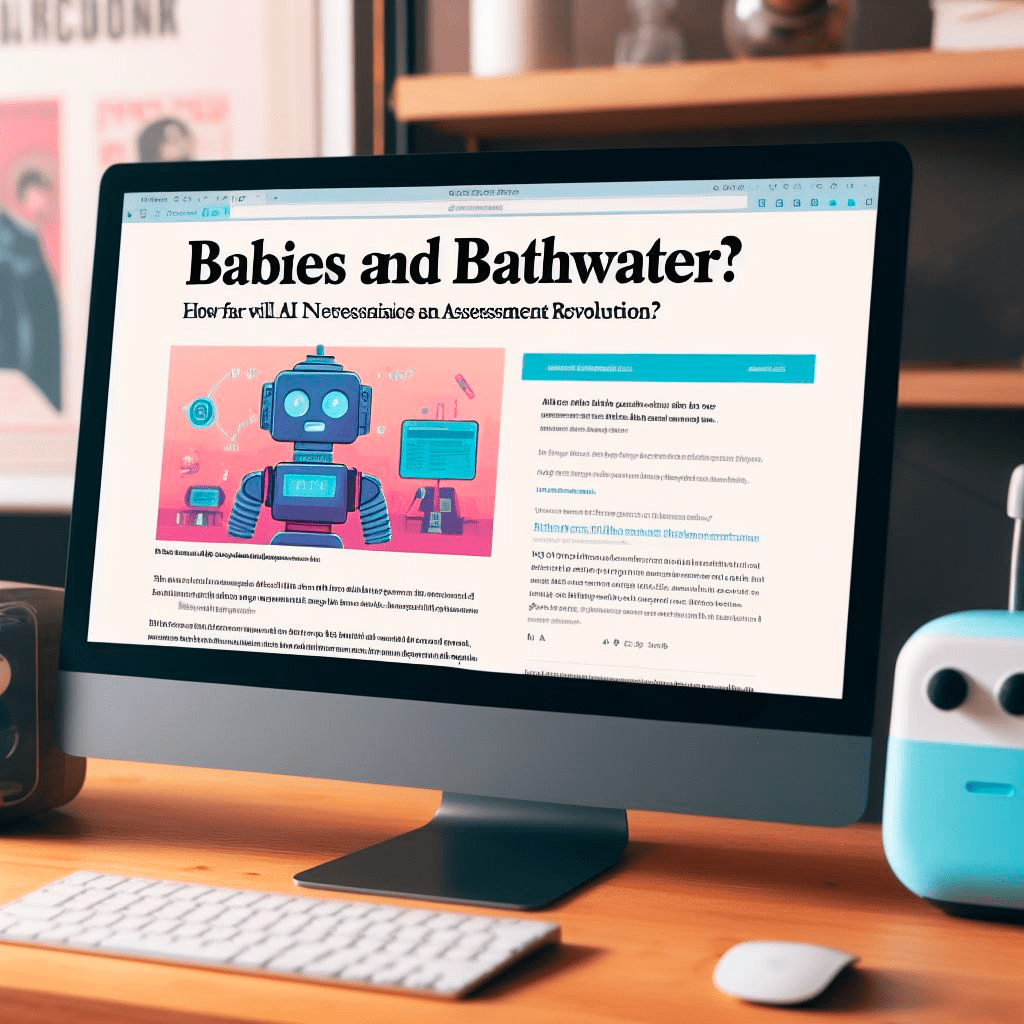
Attempt 2: AI generated image (Using Dall-e3 via Bing Chat) of computer monitor showing article called ‘Babies and Bathwater?’ below which is an image of a robot
For me (Martin), this statement from the Russell Group principles on generative AI has been instrumental in persuading some skeptics in the academic realm of the necessity to engage. It’s clear that AI literacy isn’t just another buzzword. It’s a doorway to stimulating dialogue. It’s about addressing our anxieties and reservations, then channeling those emotions to drive conversations around teaching, assessment, and learning.
Truth be told, when we dive deep into the matter of AI literacy, we’re essentially discussing another facet of information literacy. It’s a skill we aim to foster in our students and one that, as educators, we should continually refine in ourselves. Yet, I often feel that the larger academic community might not be doing enough to hone these skills, especially in the digital age where misinformation spreads like wildfire.
With the rise of AI technologies like ChatGPT, I was both amazed and slightly concerned. The first time I tested it, the results left me in awe. However, on introspection, I realized that if an AI can flawlessly generate a university-level essay, then it’s high time we scrutinized our assessments. It’s not about the capabilities of AI; it’s about reassessing the nature and objectives of our examinations.
When my colleagues seek advice on navigating this AI-augmented educational landscape, my primary counsel is simple: don’t panic. Instead, let’s critically analyze our current assessment methodologies. Our focus should pivot from regurgitation of facts to evaluating understanding and application. And if a certain subject demands instant recall of information, like in medical studies, we should stick to time-constrained evaluations.
Attempt 3: AI generated image (Using Dall-e3 via Bing Chat) of computer monitor showing article called ‘Babies and Bathnwater [sic] below which is an image of some very disturbingly muscled babies
To make our existing assessments less susceptible to AI, it’s crucial to reflect on their core objectives. This takes me back to the fundamental essence of pedagogy, where we need to continuously question and redefine our approach. Are we merely conducting assessments as a formality, or are they genuinely driving learning? It’s imperative to emphasize the process as much as the final output.
Now, if you ask me whether we should incorporate AI into our summative assessments, my perspective remains fluid. While today it might seem like a radical notion, in the future, it could be as commonplace as using the internet for research. But while we’re in this transitional phase, understanding and integrating AI should be done judiciously.
Lastly, when it comes to AI-generated feedback for students, I believe there’s potential, albeit with certain limitations. There’s undeniable value in students receiving feedback from various sources. Yet, we must tread cautiously to ensure academic integrity.
In essence, as educators and advocates of lifelong learning, we must embrace the challenges AI brings to our table, approach them with a critical lens, and adapt our strategies to nurture an equitable, AI-literate generation.
Part 2: Thoughts from the (bathroom) floor: Assessing Process Over Product in the Age of AI
The following is a synthesis of comments made during the discussion that ensued after the intial Q & A conversation.
Valuing Creation Process over End Product
There’s been a long-standing tradition in education of assessing the final product. Be it a project, an essay, or a painting, the emphasis has always been on the end result. But isn’t the journey as significant, if not more so? The time has come for assessments to shift their focus from the finished piece to the process behind its creation. Such an approach would not only value the hard work and thought process of a student but also celebrate their research journey.
Moving Beyond Memorization
Currently, knowledge reproduction assessments rule the roost. Students cram facts, only to regurgitate them during exams. However, the real essence of learning lies in fostering higher-order thinking skills. It’s crucial to design assessments that challenge students to analyze, evaluate, and create. This way, we’re nurturing thinkers and not just fact-repeating robots.
Embracing AI in the Classroom
The introduction of AI image generators in classroom projects was met with varied reactions. Some students weren’t quite thrilled with what the AI generated for them. However, this sparked a pivotal dialogue about the value of showcasing one’s process rather than merely submitting an end product.
It became evident that possessing a good amount of subject knowledge positions students better to use AI tools effectively, minimizing misuse. This draws a clear parallel between disciplinary knowledge and sophisticated AI usage. Today, employers prize graduates who can adeptly wield AI. Declining AI usage is no longer a strength but a weakness.
The Ever-Evolving AI Landscape
As AI tools constantly evolve and become more sophisticated, we can expect students to step into universities already acquainted with these tools. However, just familiarity isn’t enough. Education must pivot towards fostering honest AI usage and teaching students to discern between appropriate and inappropriate uses.
Critical AI Literacy: The Need of the Hour
AI tools, no matter how advanced, are just tools. They might churn out outputs that match a user’s intent, but it’s up to the individual to critically evaluate the AI’s output. Does it align with what you wanted to express? Does it represent your research accurately? Developing a robust AI literacy is paramount to navigate this digital landscape.
Attempt 4: AI generated image (Using Dall-e3 via Bing Chat) of computer monitor showing article called ‘Babies and Bathwater?’ below which is a photorealistic image of a baby
The Intrinsic Value of Creation
We must remember that the act of writing or creating is in itself a learning experience. Merely receiving an AI’s output doesn’t equate to learning. There’s an intrinsic value in the process of creation, an enrichment that often transcends the final product.
To sum it up, as the lines between human ingenuity and AI blur, our educational paradigm must pivot, placing process over product, fostering critical thinking, and embracing the AI wave, all while ensuring we retain our unique human touch in creation. The future beckons, and it’s up to us to shape it judiciously.
I tried the remarkable HeyGen in two other languages, this time ones that I don’t speak. Friends and family tell me the Hindi is accurate. The only oddity is how my glasses in the Hindi version are partially put back on my face before I actually did it in the original. AI translation is impressive. Voice synthesis in another langauge is impressive. Manipulating facial expressions to track translation is impressive. Put them all together and it is jaw droppingly impressive. The audio version of this text was created using Eleven Labs by the way. The voice is ‘Joseph’- I chose it because it is one of three British voices available and is also my son’s name.
Auto Translated English to Hindi (English captions available; Hindi captions not yet available)
Auto translated video English to Turkish (English captions available; Turkish captions not yet available)
I have just spent a week in Egypt and, I suppose unsurprisingly, have returned to find that there have been yet more new AI tools released and important tweaks to existing ones. The things that I have been drawn to are the ‘Smart Slides’ plugin in GPT-4 and the image interpreter in Bing Chat. Before I show examples of my ‘fiddling when I should be working’, the one AI tool I found very useful in Egypt was the Google Lens translation tool. When I did have wifi I used it quite a lot to translate Arabic text as below. We have grown used to easy translation using tools like Google Translate but this really does take things to the next level, especially when dealing with a script you may not be familiar with. We are discussing this week at work the extent to which AI translation might form a legitimate part of the production of assessed work and I think it is going to be quite divisive. I imagine that study in the future will naturally become increasingly translingual and, whilst I acknowledge and understand the underpinning context of studying for degrees in any given linguistic medium, I feel like we may need to address our assumptions about what that connotes in terms of skills and ways students approach study. Key questions will be: If I think and produce in Language 1 and use AI to translate portions of that into Language 2 (which is the degree host language), how much is that a step over an academic integrity line? How much does it differ and matter in different disciplines? Are we in danger of thinking neo-colonially with persisting with insistence of certain levels of linguistic competence (in Global North internationalised degrees)?
Screenshot from Google Lens on an iphone screen showing an Egyptian banknote with Arabic text translated into English on screen.
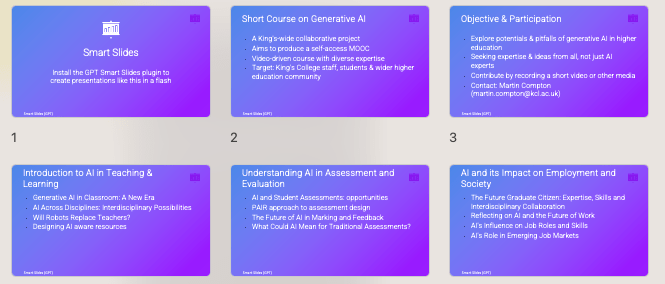
As a Chat GPT ‘plus’ user I have, for my 20 bucks a month, access to GPT-4 and the growing stack of plug ins. I saw on Twitter the ‘Smart Slides’ plug in demoed and thought I’d better give that a whirl. I wanted to see how it comparted to other tools like Tome.app which can instantly produce presentational materials like this and I was blown away by Gamma.app when I first saw it. The generation of pre-formatted, editable slides on a given topic based on a prompt is very impressive the first time you see it but, like the anodyne Chat GPT generated ‘essays’, it’s not the ‘here’s something I made earlier’ that will likely be the most useful, but (in this case) the web-based, intuitive creation and sharing PowerPoint alternative format. This one I generated in seconds to illustrate to a colleague and it reamins un-tweaked.
I have found for my own use that ideation, summarisation and structuring are my go to uses for ChatGPT and all of these could feed creation of a slide deck. Plus, whilst I tend to use tools like Mentimeter to create slide decks, I am not daft enough to think that PowerPoint is still not the Monarch of Monarchs in a sector where content (for better or worse!) remains King.
The ChatGPT Smart Slides plug in works best in my limited experiments if you supply a decent amount of prompt material but also gives a decent starting point when using only a minimal starting prompt. To create the one that follows I used my own pre-authored rationale and suggested structure for a short course on Generative AI, downloaded the output, re-opened it in PowerPoint, changed the design away from the default ugly white text on purple background and then used the in-app design tools to tweak the look and feel but not the content.
Ugly default PowerPoint design showing multiple slides in graduated purples with white text
It took 5 minutes to turn a document into useable slides so hard to argue with that as a template at least.
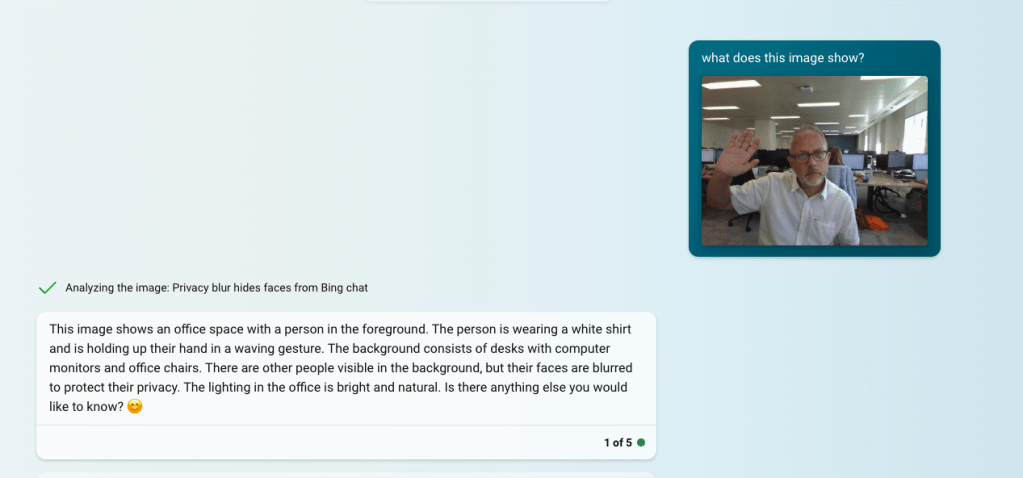
Finally, I noted the release of image reading AI which is a Bing Chat option (note you can only use in Edge browser and with safe search off or set to moderate). The first thing I tried (predictably I guess) was an image of me taken this morning (post holiday warts ‘n’ all) and the description is impressive as a starting point for generating Alt-Text for example.
Screenshot from Bing chat of uploaded image of a man waving at a camera in a n office with below the AI image description which reads: This image shows an office space with a person in the foreground. The person is wearing a white shirt and is holding up their hand in a waving gesture. The background consists of desks with computer monitors and office chairs. There are other people visible in the background, but their faces are blurred to protect their privacy. The lighting in the office is bright and natural. Is there anything else you would like to know? 😊
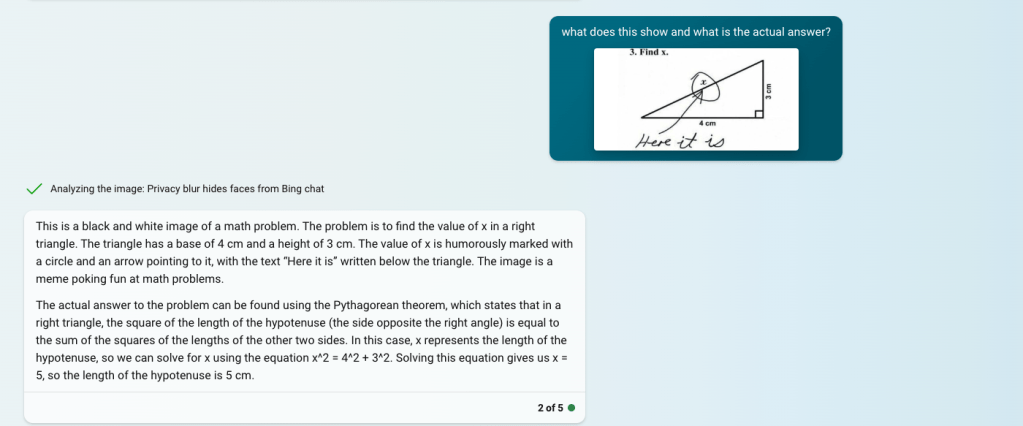
I then thought of the advice universities were giving staff about making assessments ‘AI-proof’ (!) and how use of images was one recommendation. So for my next experiment I tried giving it a maths question in the form of an image.
Screenshot of Bing Chat where a maths problem is posted and then responded to in the following way by the AI: This is a black and white image of a math problem. The problem is to find the value of x in a right triangle. The triangle has a base of 4 cm and a height of 3 cm. The value of x is humorously marked with a circle and an arrow pointing to it, with the text “Here it is” written below the triangle. The image is a meme poking fun at math problems.
The actual answer to the problem can be found using the Pythagorean theorem, which states that in a right triangle, the square of the length of the hypotenuse (the side opposite the right angle) is equal to the sum of the squares of the lengths of the other two sides. In this case, x represents the length of the hypotenuse, so we can solve for x using the equation x^2 = 4^2 + 3^2. Solving this equation gives us x = 5, so the length of the hypotenuse is 5 cm.
Given that it got it right, explained it but also noted the ‘humourous meme’ nature of the image suggests that bit of advice at least is well and truly redundant.
One of the biggest worries about generative AI is in terms of how it could impact the development of the ability to write and the learning that is, in essence, formed and evolved through the construction of sentences, paragraphs and the outputs of writing from songs to blogs to academic essays. There’s been some really thoughtful work in this area aleady and Anna Mills has collected some amazing resources that offer a range of perspectives and approaches as well as plenty of food for thought about impacts and issues. This series of videos ‘Generative AI practicals’ is designed to suggest ways in which tools like ChatGPT and Google Bard might be used by academic staff and students in ways other than pumping out text indiscriminately and uncritically! In this video I isolate one element from a marking rubric and using two genAI tools ask them to assess a paragraph and then suggest alternatives across grade bands.
This video looks at how students might start to think about bouncing ideas around in ChatGPT (or similar) to get to better and/ or deeper understandings of the subjects they are studying. This is not about producing content but engaging with ideas.
There are loads of things we (in HE and education more broadly) need to think about and do when it comes to generative AI, both cognitively and practically. I am alert to and concerned about the ethical and practical implications of generative AI tools but here want to focus on ways in which we (teachers and students) might find ways to use these tools productively (as well as ethically and with integrity). My view is that the ‘wow’ (or OMG) moment experienced when you witness tools like chatGPT spouting text needs to be looked beyond and ways in which the mooted idea of AI personal assistants can actually be realised need to be explored and shared. As a compulsive fiddler I am sometimes struck by how little other people have experimented but need to remember that stuff I might do in my spare time may have limited appeal for others (I am, after all, a Spurs supporter).
This first video then (4 mins) shows how I might take take some lecture notes (which may be notes from anything of course) and then uses ChatGPT to make sense of them.