Here’s my chat with the brilliant Tim Fawns as part of the series of 10 minute videos on Generative AI.
Month: August 2023
Lost in translation?
I have just spent a week in Egypt and, I suppose unsurprisingly, have returned to find that there have been yet more new AI tools released and important tweaks to existing ones. The things that I have been drawn to are the ‘Smart Slides’ plugin in GPT-4 and the image interpreter in Bing Chat. Before I show examples of my ‘fiddling when I should be working’, the one AI tool I found very useful in Egypt was the Google Lens translation tool. When I did have wifi I used it quite a lot to translate Arabic text as below. We have grown used to easy translation using tools like Google Translate but this really does take things to the next level, especially when dealing with a script you may not be familiar with. We are discussing this week at work the extent to which AI translation might form a legitimate part of the production of assessed work and I think it is going to be quite divisive. I imagine that study in the future will naturally become increasingly translingual and, whilst I acknowledge and understand the underpinning context of studying for degrees in any given linguistic medium, I feel like we may need to address our assumptions about what that connotes in terms of skills and ways students approach study. Key questions will be: If I think and produce in Language 1 and use AI to translate portions of that into Language 2 (which is the degree host language), how much is that a step over an academic integrity line? How much does it differ and matter in different disciplines? Are we in danger of thinking neo-colonially with persisting with insistence of certain levels of linguistic competence (in Global North internationalised degrees)?

As a Chat GPT ‘plus’ user I have, for my 20 bucks a month, access to GPT-4 and the growing stack of plug ins. I saw on Twitter the ‘Smart Slides’ plug in demoed and thought I’d better give that a whirl. I wanted to see how it comparted to other tools like Tome.app which can instantly produce presentational materials like this and I was blown away by Gamma.app when I first saw it. The generation of pre-formatted, editable slides on a given topic based on a prompt is very impressive the first time you see it but, like the anodyne Chat GPT generated ‘essays’, it’s not the ‘here’s something I made earlier’ that will likely be the most useful, but (in this case) the web-based, intuitive creation and sharing PowerPoint alternative format. This one I generated in seconds to illustrate to a colleague and it reamins un-tweaked.
I have found for my own use that ideation, summarisation and structuring are my go to uses for ChatGPT and all of these could feed creation of a slide deck. Plus, whilst I tend to use tools like Mentimeter to create slide decks, I am not daft enough to think that PowerPoint is still not the Monarch of Monarchs in a sector where content (for better or worse!) remains King.
The ChatGPT Smart Slides plug in works best in my limited experiments if you supply a decent amount of prompt material but also gives a decent starting point when using only a minimal starting prompt. To create the one that follows I used my own pre-authored rationale and suggested structure for a short course on Generative AI, downloaded the output, re-opened it in PowerPoint, changed the design away from the default ugly white text on purple background and then used the in-app design tools to tweak the look and feel but not the content.
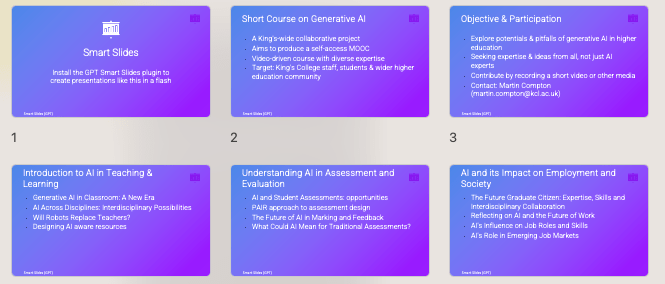
It took 5 minutes to turn a document into useable slides so hard to argue with that as a template at least.
The completed slides after a little (PowerPoint-y AI design fiddling)
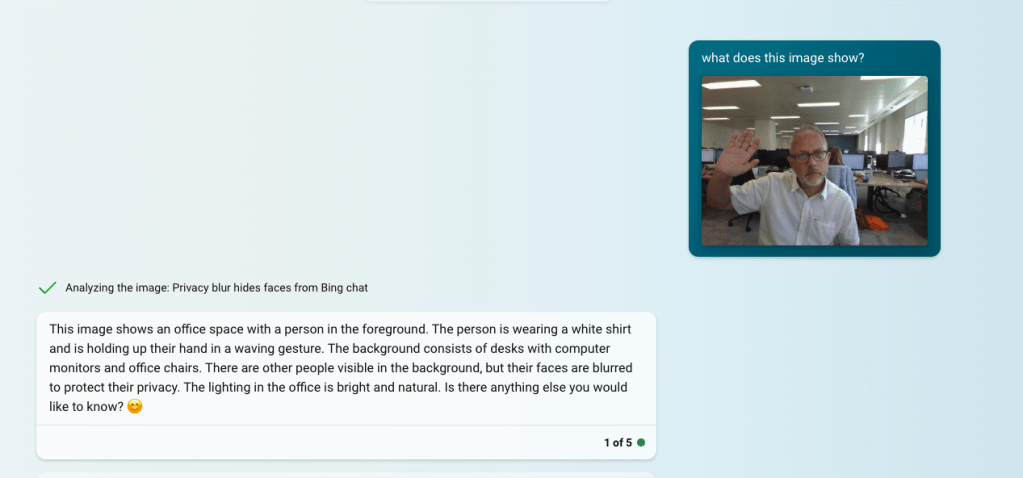
Finally, I noted the release of image reading AI which is a Bing Chat option (note you can only use in Edge browser and with safe search off or set to moderate). The first thing I tried (predictably I guess) was an image of me taken this morning (post holiday warts ‘n’ all) and the description is impressive as a starting point for generating Alt-Text for example.
I then thought of the advice universities were giving staff about making assessments ‘AI-proof’ (!) and how use of images was one recommendation. So for my next experiment I tried giving it a maths question in the form of an image.
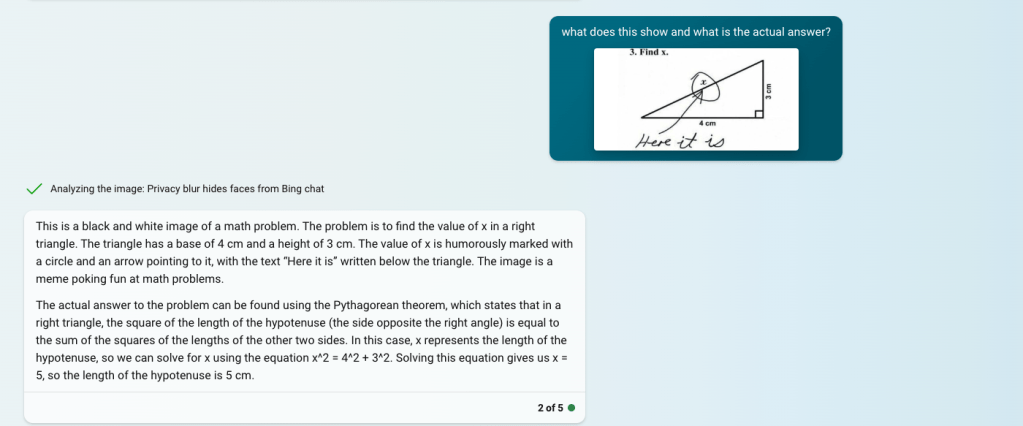
The actual answer to the problem can be found using the Pythagorean theorem, which states that in a right triangle, the square of the length of the hypotenuse (the side opposite the right angle) is equal to the sum of the squares of the lengths of the other two sides. In this case, x represents the length of the hypotenuse, so we can solve for x using the equation x^2 = 4^2 + 3^2. Solving this equation gives us x = 5, so the length of the hypotenuse is 5 cm.
Given that it got it right, explained it but also noted the ‘humourous meme’ nature of the image suggests that bit of advice at least is well and truly redundant.
Creating a marking rubric (using ChatGPT)
Long term I have no doubt we will find ways of working using generative AI tools that will feel as second nature as Googling something or picking up a mobile phone to do any one of a million things (that is not ‘phoning’). I’m particularly interested in how we might use them effectively NOW, especially for jobs that may connote ‘drudge’. There are wider issues around consistency in feedback and marking of course, but having a rubric is certainly one way to move towards this. In my experience, though, the expectation of a rubric shared between markers and/ or being shared with students is not always realised. Creating one from scratch can be as daunting as it is time-consuming. This video shows how, with a carefully worded prompt, you can get an AI assistant to take on a lot of the drudgery.
Prompt and outputs from ChatGPT and Google Bard
Using rubrics and generativeAI tools to reflect on and develop writing
One of the biggest worries about generative AI is in terms of how it could impact the development of the ability to write and the learning that is, in essence, formed and evolved through the construction of sentences, paragraphs and the outputs of writing from songs to blogs to academic essays. There’s been some really thoughtful work in this area aleady and Anna Mills has collected some amazing resources that offer a range of perspectives and approaches as well as plenty of food for thought about impacts and issues. This series of videos ‘Generative AI practicals’ is designed to suggest ways in which tools like ChatGPT and Google Bard might be used by academic staff and students in ways other than pumping out text indiscriminately and uncritically! In this video I isolate one element from a marking rubric and using two genAI tools ask them to assess a paragraph and then suggest alternatives across grade bands.
Prompt & Outputs from ChatGPT and Google Bard
 HEducationist